TikTok for Android TV transforms the popular short-form video experience, bringing the vibrant world of creative content directly to your living room’s biggest screen. This specialized version of the widely acclaimed platform is meticulously optimized for television viewing, offering an immersive way to discover and enjoy countless videos, from trending dances and comedic skits to educational insights and captivating documentaries, all from the comfort of your couch. It redefines casual entertainment, making it easier than ever to share viral moments with friends and family.

TikTok for Android TV
TikTok Pte. Ltd.
Download
32.04 MB
TikTok for Android TV Screenshots

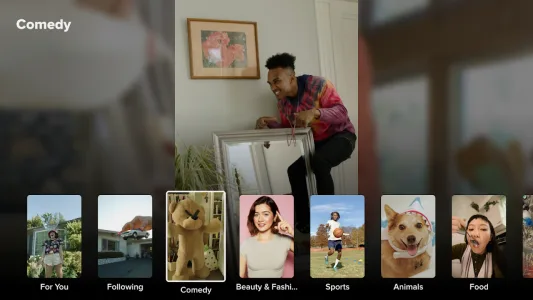
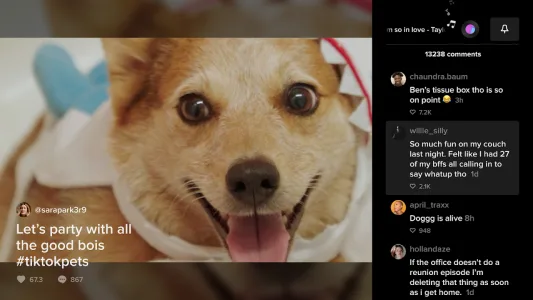
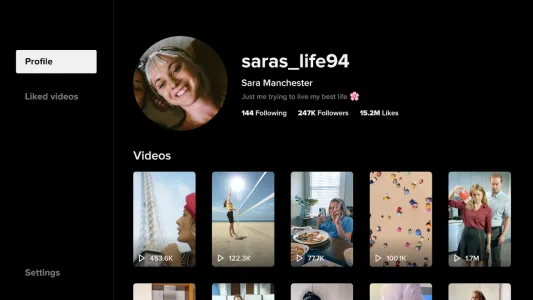

1 / 5
32.04 MB
Size
12.3.7.1
Version
7+
Android
Universal
Arch
About TikTok for Android TV
TikTok for Android TV transforms the popular short-form video experience, bringing the vibrant world of creative content directly to your living room’s biggest screen. This specialized version of the widely acclaimed platform is meticulously optimized for television viewing, offering an immersive way to discover and enjoy countless videos, from trending dances and comedic skits to educational insights and captivating documentaries, all from the comfort of your couch. It redefines casual entertainment, making it easier than ever to share viral moments with friends and family.
Big Screen Immersion
Viewing content on a larger display fundamentally changes the way you interact with TikTok’s diverse library. The expansive screen of an Android TV enhances every visual detail, allowing the intricate choreography of a dance or the subtle nuances of a comedic sketch to truly stand out. This provides a significantly more engaging and visually rich experience compared to the smaller confines of a mobile phone.
This larger-than-life presentation also fosters a communal viewing experience. Friends and family can gather around the television, sharing laughs and discovering new trends together without huddling over a small device. It turns passive individual consumption into an interactive group activity, making the viral content even more enjoyable and memorable for everyone present.
Intuitive User Interface
Navigating through an endless stream of videos is made remarkably simple thanks to an interface specifically designed for TV remotes. The layout prioritizes ease of use, allowing users to effortlessly scroll through their For You page or explore different categories with just a few clicks. This thoughtful design ensures that anyone can pick up the remote and immediately dive into the entertainment.
The streamlined controls extend beyond simple navigation, enabling quick interactions like liking videos, following creators, or even accessing comment sections with minimal effort. This intuitive approach removes any friction associated with adapting a mobile-first application to a television, ensuring a smooth and enjoyable user journey from the moment you launch the service.
Seamless Content Discovery
The heart of the TikTok experience lies in its powerful recommendation algorithm, and this remains true for the TV version, expertly tailoring content to your viewing habits. Your For You page on the big screen will continue to evolve based on your interactions, ensuring a personalized stream of videos that perfectly aligns with your interests and preferences, optimized for a relaxed, living room setting.
Beyond personalized feeds, the platform offers robust tools for exploring new content. Users can easily browse trending topics, search for specific creators, or delve into various content categories, uncovering hidden gems and expanding their entertainment horizons. This comprehensive discovery mechanism ensures that fresh and engaging videos are always just a remote click away.
Enhanced Audio Experience
Audio plays a critical role in the appeal of many TikTok videos, from catchy music to hilarious sound effects and impactful voiceovers. With the integration into an Android TV, the audio experience is significantly elevated, leveraging your television’s speakers or connected sound system for richer, clearer sound. This brings a new dimension to the content, making it more impactful and enjoyable.
The improved sound quality ensures that every beat, every word, and every sonic detail is delivered with clarity, enhancing the overall immersion. Whether it’s the booming bass of a popular track or the subtle comedic timing of a voice clip, the enhanced audio environment makes the content truly resonate with the audience, elevating the entertainment value considerably.
Pure Consumption, No Creation
Unlike its mobile counterpart, this iteration focuses purely on content consumption, offering a relaxed, passive viewing experience without the pressure of creation. This distinction allows users to fully immerse themselves in the entertainment without needing to worry about filming, editing, or uploading their own videos. It’s an entertainment hub designed for pure enjoyment.
This consumption-only approach makes TikTok for Android TV an ideal solution for those who simply want to unwind and be entertained. It streamlines the user experience, eliminating any complexities associated with content creation and focusing entirely on delivering an endless stream of engaging videos directly to your large screen, perfect for a casual evening in.
Frequently Asked Questions
Yes, the service is generally free to download and use, offering access to its vast content library without a subscription. Like the mobile app, it may feature in-app purchases or ads, but the core viewing experience remains free.
No, this version is designed exclusively for content consumption. It does not include features for recording, editing, or uploading videos. For content creation, you would need to use the mobile application.
The platform utilizes an advanced algorithm that learns from your viewing history, likes, shares, and follows to curate a For You page specifically tailored to your interests, ensuring a highly personalized and engaging experience.
While you can browse some content as a guest, logging in with your existing TikTok account unlocks a fully personalized experience, including access to your saved videos, followed creators, and a more refined For You page.
Additional APP Information
Package Name
com.tiktok.tv
Developer
TikTok Pte. Ltd.
Category
Signature
00a584e375b5573c89e1f06f5cf60d0d65ddb632
Get it On

You are now ready to download TikTok for Android TV for free. Here are some notes:
- Please read our APK Info and installation instructions carefully for the game & app to work properly
- Read the FAQ carefully for more details
4.6/5 (1,087 votes)